case study
Work Order Splitter
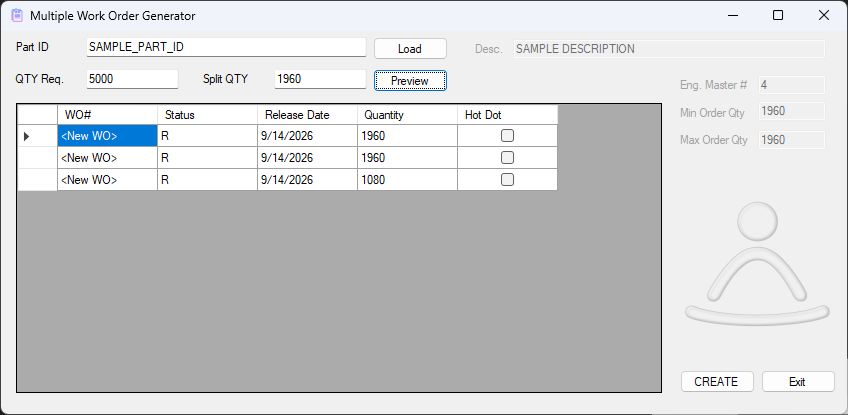
VISUAL's standard work order screen assumes one work order at a time. When a single planned quantity actually needs to become several separate work orders — split across lots, shifts, or however the shop floor needs to divide the work — the only way to do it by hand is to fill out that same screen over and over, retyping the same part number, routing, and reference details for every split.
The problem
Repetitive manual entry is exactly where mistakes creep in. A quantity typo on the fourth of six splits is easy to make and easy to miss, and there's no shortcut in VISUAL's own UI for "make N of these, splitting the quantity" — it's N trips through the same screen, however many times the plan calls for.
The approach
The tool starts from two inputs: a total quantity and how many ways to split it. From that it proposes a default split — dividing the quantity evenly and handling whatever's left over — and lays the proposed splits out in an editable grid, one row per resulting work order. Nothing is created yet at this point; it's a proposal you can review, and adjust any individual row by hand if the shop floor needs something other than an even split.
Once the split looks right, the tool creates the work orders through VISUAL's API Toolkit — the same COM-based business object layer VISUAL's own client uses internally — rather than writing directly to VISUALDB. That distinction matters more than it sounds: going through the API Toolkit means every generated work order passes through VISUAL's own validation and business rules, exactly as it would if someone had typed it in by hand. Writing straight to the work order tables with SQL is a common shortcut in ERP customization, and a risky one — it's easy to produce a row that looks correct but silently violates something VISUAL assumed would always be true.
The outcome
What used to mean opening the work order screen repeatedly and re-entering the same header information each time now takes one pass: enter the total and the split count, review the proposed quantities in the grid, adjust anything that needs it, and submit. The repetition — and the transcription errors that come with repetition — are gone, and every resulting work order is exactly as valid as one entered by hand.
← back to case studies