tool
File Forcer
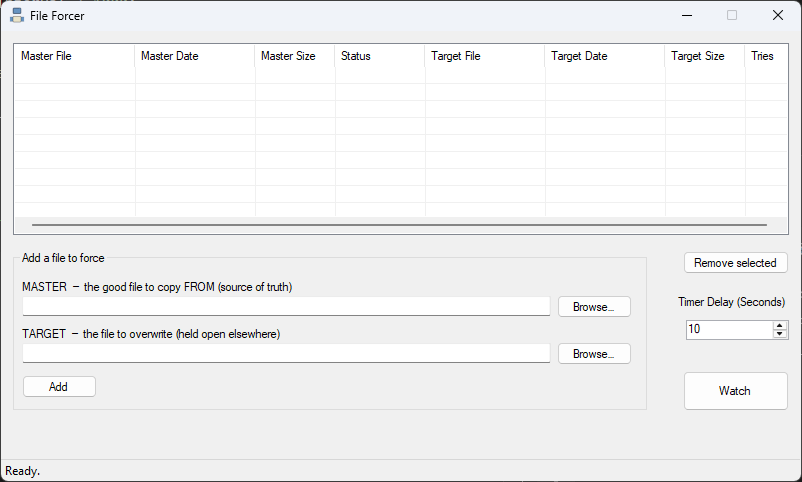
File Forcer keeps a file forced to the version you want. You give it a master — your known-good copy — and a target — the file that some other program keeps holding open. It watches the target, and the moment the lock releases, it overwrites it with the master. No babysitting, no timing it yourself, no fighting the "file in use" error. It just waits for the door to open and slips the right file in.
Why it exists
Some files get held hostage. A report template a running app has open, a config another process won't let go of, a shared file locked just long enough to be annoying — you try to replace it, Windows says no, and you're left retrying by hand until the other program finally lets go. File Forcer turns that "wait, retry, wait, retry" into something you set once and forget. It does the retrying for you and pounces the instant the file is free.
What it does
- Master → Target, always the right direction — your good copy overwrites the locked file, never the other way around
- Watches and pounces — polls on an interval you set and copies the moment the target is no longer held open
- Retries automatically — a locked file doesn't fail the job; it stays in line and gets swapped as soon as the lock clears
- Live status — each row shows Waiting, Locked, or Replaced, plus a running count of tries so you can see it working
- Adjustable delay — dial the poll interval up or down, even while it's running, so shortening it takes effect right away
- Missing-file detection — flags a master or target that isn't there instead of silently doing nothing
- Multiple files at once — queue up as many master/target pairs as you like and let it work the whole list
Under the hood
Every tick, File Forcer walks its list and tries the copy for anything still waiting. The trick is that a locked file doesn't throw when you check whether it exists — it throws when you actually try to write it. So rather than pre-checking the lock, File Forcer simply attempts the copy and treats the "in use" exception as not yet rather than failed: the row flips to Locked, the try counter ticks up, and it comes back around next poll. When the copy finally succeeds, the row goes Replaced and drops out of the rotation. When nothing's left waiting, it stops itself.
The whole thing is a single 1-second timer loop over a small list — no background threads, no file-system watchers to leak, nothing to clean up. Just a patient loop that keeps knocking until the file answers.
Get it
Built for Windows, no installer.
← back to tools