tool
MyDesktopOrganizer
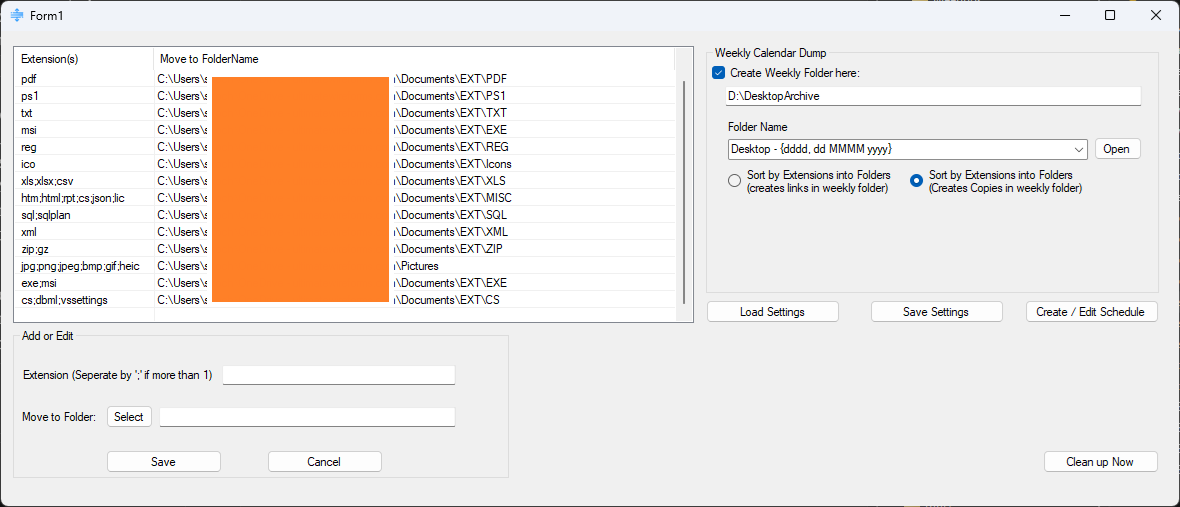
MyDesktopOrganizer is the automatic cousin of a manual file sorter. Instead of dragging files where they belong, you write the rules once — this extension goes to that folder — and the tool sweeps your desktop on a weekly schedule, filing everything away without you lifting a finger.
Why it exists
Desktops rot. Files land there "just for now" and stay for months. Rather than tidying by hand and never quite keeping up, MyDesktopOrganizer turns desktop hygiene into a rule you set and forget — the cleanup happens on its own, every week.
How it works
- Extension rules — map file types to destination folders (for example
.pdf;.docxinto your Documents folder). Rules are saved so they persist between runs. - Sweeps what's aged — on each run it targets files older than the start of the current week, leaving this week's fresh files alone.
- Dated weekly archives — matching files are also copied into a weekly folder whose name you template with a date, like
Week of {yyyy-MM-dd}; the date is filled in automatically. - Copy or link — choose whether to move files into their type folders and archive a copy, or move them and leave a shortcut behind.
- Runs on a schedule — command-line flags let it clean up and quit (
/QuitAfterRun) or clean up and stay open (/StayOpenAfterRun), so Windows Task Scheduler can drive it silently in the background.
Under the hood
Rules and preferences live in plain INI files in your AppData folder, so the configuration is human-readable and easy to back up. The weekly-folder name is treated as a small template: anything in braces is read as a .NET date format and replaced with the week's date.
// "Week of {yyyy-MM-dd}"  ->  "Week of 2026-08-02"
var match = Regex.Match(folder, @"\{(.*?)\}");
if (match.Success)
    folder = folder.Replace(match.Value,
        lastSunday.ToString(match.Groups[1].Value));
Get it
Built for Windows, no installer. Pair it with Task Scheduler for hands-off weekly cleanup.
← back to tools