tool
Remote Assistance Helper
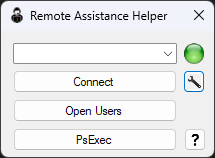
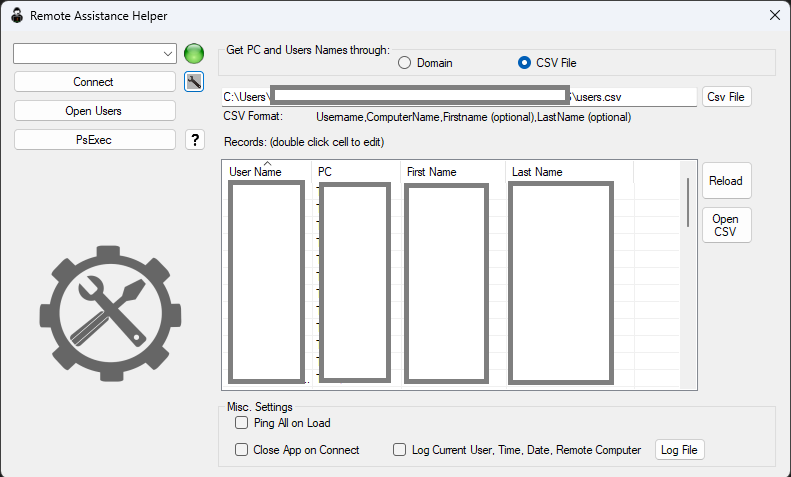
Windows already ships a way to offer someone remote help — msra.exe /offerra. What it doesn't ship is a way to remember who's who. This app is that missing piece: a small always-on-top directory that turns "what's your computer's name again?" into picking a name from a list and clicking Connect.
Why it exists
Offering remote assistance the manual way means knowing the target machine's hostname off the top of your head, or digging for it, every single time. For a one-person IT department fielding help requests all day, that lookup is the annoying part — the actual remote session is the easy part. This app keeps a standing list of users and their PCs, shows at a glance which ones are online, and turns the whole hand-off into one click.
What it does
- One-click Remote Assistance — pick a name, hit Connect, and it shells out to
msra.exe /offerra <computer>— no typing hostnames - A directory you maintain yourself — a plain CSV of
Username,ComputerName,FirstName,LastName, loaded into an autocomplete combo box you can just start typing into - Color-coded status — a green, red, or grey orb next to the selection shows whether that machine answered a ping, checked lazily rather than pinging the whole list up front
- Open Users — jumps straight to
\\PC\C$\Users\<user>\Desktop, for the times you just need to grab a file rather than start a full session - PsExec shortcut — launches a remote
cmdsession on the selected machine for anything a GUI session doesn't cover - Optional connection logging — user, target PC, action, and timestamp, appended to a local log file you can open from the app
- Inline editing — double-click a cell in the grid to fix a name, and it writes straight back to the CSV
There's a second mode in here too: point it at a domain and it'll walk selected OUs over LDAP, pull managedBy off each computer object, and build the same directory from Active Directory instead of a CSV. It's a neat trick — no file to maintain, ever — but in practice I never really warmed up to it and just keep a CSV around instead. Same with "Ping All on Load": pinging everything up front is the more thorough option, but I leave it off and let the app check a machine only when I actually select it.
Under the hood
The status orb is driven by a nullable bool? that pings itself lazily the first time anything asks for it, rather than the constructor forcing every row to ping on load:
bool? _IsOnline = null;
public bool? IsOnline
{
    get
    {
        if (_IsOnline == null)
        {
            Ping();
        }
        return _IsOnline;
    }
    set { _IsOnline = value; }
}

private void Ping()
{
    var ping = new Ping();
    try
    {
        PingReply reply = ping.Send(ComputerName);
        if (reply.Status == IPStatus.Success)
            _IsOnline = true;
    }
    catch
    {
        _IsOnline = false;
    }
}
Load a CSV of two hundred machines with "Ping All on Load" off, and nothing gets pinged — the whole list just sits there with the orb unset. Select one entry, and only that one IsOnline getter fires, pinging exactly the machine you're about to connect to. It's a small thing, but it's the difference between the app feeling instant on load versus stalling on a sweep of machines you weren't going to talk to anyway.
Get it
The core of the app: the main form and its logic, the designer-generated layout, the Computers model behind the directory and status orbs, and the small OrgUnits helper for the AD mode. This is a slice of a larger WinForms project — not a drop-in, buildable kit — so treat it as reference rather than a ready .csproj.