tool
UWI Shortcutbar
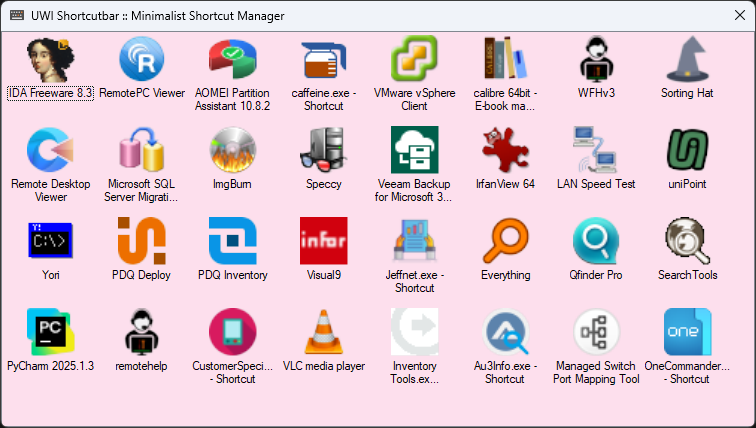
The Shortcutbar is a thin strip that floats above your other windows and holds the handful of things you actually reach for — apps, documents, network paths, whatever. Drag a shortcut onto it, and it's one double-click away from then on. No menus to dig through, no desktop to hunt across.
Why it exists
A shared shop-floor machine gets used by a lot of hands, and everyone needs the same short list of destinations. The Shortcutbar puts those in one predictable place that stays put. It's deliberately small: it does one job and stays out of the way until you need it.
What it does
- Drag-and-drop shortcuts — drop a
.lnk,.url, program, or document straight onto the bar - Always on top — floats above your work so it's there when you glance for it
- Sharp, real icons — pulls high-resolution icons through the Windows shell, with proper transparency instead of the muddy 16-pixel version
- Knows what's missing — if a target goes offline (a disconnected network share, a moved file), its icon greys out so you know before you click
- One instance, always — launching it again just brings the running bar to the front instead of stacking copies
- Double-click to launch, right-click to remove — that's the whole interface
Under the hood
A couple of details worth calling out for anyone who likes to look inside.
Windows hands most apps a small, flat icon. The Shortcutbar goes through the shell's image factory instead, so you get the crisp 32-bit icon with its alpha channel intact:
// SIIGBF_ICONONLY | SIIGBF_BIGGERSIZEOK
hr = factory.GetImage(sz, 0x4 | 0x1, out hBitmap);
And it stays a single instance using a named mutex — a second launch simply asks the first to show itself, then bows out:
public static readonly int WM_SHOWFIRSTINSTANCE =
    NativeMethods.RegisterWindowMessage("ShortcutBar_ShowFirstInstance");

static void Main()
{
    bool createdNew;
    using (var mutex = new Mutex(true, @"Local\ShortcutBar_SingleInstance", out createdNew))
    {
        if (!createdNew)
        {
            // Another instance is already running: ask it to show itself, then exit.
            NativeMethods.PostMessage(NativeMethods.HWND_BROADCAST, WM_SHOWFIRSTINSTANCE, IntPtr.Zero, IntPtr.Zero);
            return;
        }

        Application.EnableVisualStyles();
        Application.SetCompatibleTextRenderingDefault(false);
        Application.Run(new Form1());

        GC.KeepAlive(mutex); // hold the mutex for the app's lifetime
    }
}

protected override void WndProc(ref Message m)
{
    if (m.Msg == Program.WM_SHOWFIRSTINSTANCE)
    {
        // A second instance was started — show this one instead.
        ShowAndActivate();
        return;
    }

    base.WndProc(ref m);
}
Get it
Built for Windows, no installer — drop the executable and run. (Download link coming soon.)
← back to tools