tool
The Sorting Hat
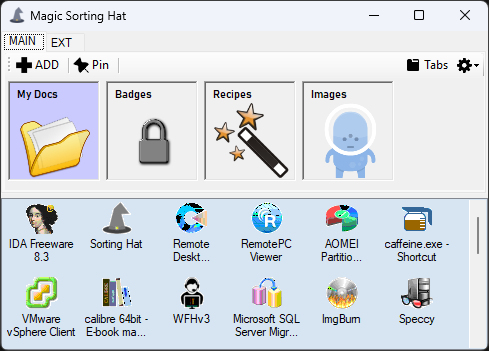
The Sorting Hat is a small desktop board for putting things where they belong. You build panels — each one a colored tile pointing at a folder — and organize them across tabs. Drag a file onto a panel and it's filed into that panel's folder. Drag it onto the bin panel and it's gone. It's the physical act of sorting mail into slots, turned into software.
Why it exists
Downloads pile up. Files land on the desktop and stay there. The Sorting Hat makes putting a file in its place a single drag instead of a copy, a navigate, and a paste — so tidying up stops being a chore you postpone.
What it does
- Panels tied to folders — each colored tile drops files straight into its target folder
- Tabs to group them — sort panels into tabs you can add, rename, reorder, and drag around
- A bin panel — a panel with no folder becomes a recycle drop; files dragged there are deleted
- Send-to menus — move a panel to another tab from a right-click menu
- Broken-link detection — if a panel's folder disappears, it flags itself so you're not filing into the void
- Custom icons and colors — pick an image and a color per panel so the board reads at a glance
Under the hood
Panels persist as plain lines of text — tab, name, folder, color, icon — so the whole board is a simple, human-readable file you could edit by hand if you ever needed to. Each drop just resolves the panel's folder and moves the file there; the bin panel is simply a panel with no folder set.
It also carries a small built-in shortcut bar for launchers, with type-to-select search — start typing and it jumps to the matching entry. (That's a cousin of the standalone UWI Shortcutbar.)
Get it
Built for Windows, no installer.
← back to tools